
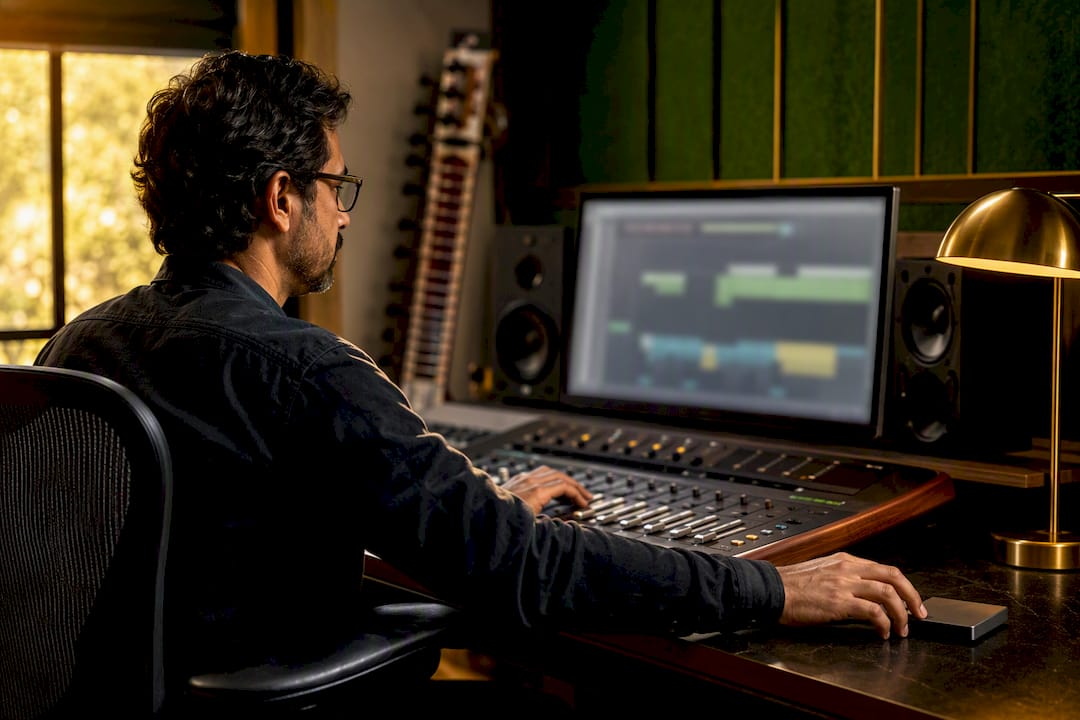
Recording deliverables are the finished audio files, backups, stems, and paperwork you hand over so a project can be mixed, distributed, or archived without a single frantic phone call. At minimum, you’re supplying a primary master, two safeties, stems, consolidated multitracks, and full documentation. Sample rate, bit depth, file naming, and packaging follow. Get those items right and nobody ever has to ask you for them twice.
TL;DR:
- Deliver a complete set of recording files including approved masters, stems, and consolidated multitracks, with clear labeling and consistent start points.
- Use 24-bit files at 44.1 kHz for music distribution and 48 kHz for video, unless a client requests higher sample rates for specific purposes.
- Consolidate tracks starting at the session’s zero point, name files with a standard template, and include detailed session notes and metadata for proper reconstruction.
- Verify every delivery with checksums, encrypt sensitive files, and provide clear documentation such as track sheets, ISRC codes, and a folder structure.
- Keep at least two safeties on separate media and plan for format migration to ensure long-term preservation of the audio assets.
Table of Contents
- What Are the Core Types of Recording Deliverables?
- What Sample Rate and Bit Depth Should You Deliver?
- How Do You Consolidate and Name Stems Correctly?
- What Documentation Should Accompany Every Deliverable?
- Which Delivery Method Is Right for Your Project?
- What’s the Right Backup and Archival Plan?
- What Should a Final Delivery Checklist Include?
- How Do You Preserve Nuance in Cultural and Acoustic Sessions?
- Why Cutting Corners on Deliverables Costs You Later
- Book a Session That Delivers Everything You Need, the First Time
- Sources
What Are the Core Types of Recording Deliverables?
Every deliverable set answers one question: what does the next person in line need to do their job? A mix engineer needs stems. A distributor needs a master. An archivist needs everything, labeled and flattened. Knowing which deliverable serves which purpose keeps you from either under-delivering or drowning a client in files they didn’t ask for.
Approved masters come first. This is the final stereo (or immersive) mix, approved by the artist or label, ready for release. If the project involves Dolby Atmos or another spatial format, you’ll deliver both the immersive master and a stereo fold-down, since most streaming platforms still default to two-channel playback.
Stem sets are the second pillar. A standard stem package usually breaks the mix into drums, bass, music (everything else instrumental), and vocals. Film and TV work often needs special-case stems too:
- Instrumental mix, for licensing and sync placements
- A cappella / vocal-only mix, for remixes and mashups
- M&E (music and effects) mix, which strips dialogue for foreign dubbing
Consolidated multitracks are your session’s raw material, exported as continuous files rather than a DAW project. This lets another engineer rebuild your session in a different program entirely, which matters more than most people admit when a client switches studios mid-project.
Beyond those three, a few situational deliverables come up often enough to plan for. DDPs (Disc Description Protocol files) still get requested for physical CD manufacturing. Performance mixes get used for live broadcast or video sync. Low-latency monitor exports matter when a remote collaborator needs a rough mix fast, without the polish a final master demands. Knowing which of these a project actually needs, before you’re asked, is what separates a smooth handoff from a week of email chains.
What Sample Rate and Bit Depth Should You Deliver?
Deliver at 24-bit, and choose your sample rate based on where the file is going, not on what sounds impressively high-tech. That’s the short version, and it holds up against both current engineering consensus and basic file management sense.
For music distribution, 44.1 kHz at 24-bit remains the practical standard. Video work generally calls for 48 kHz, since that rate aligns with broadcast and post-production pipelines. If a client or label specifically requests 96 kHz for archival purposes, that’s reasonable to accommodate, but don’t assume it by default. Higher sample rates balloon file sizes and processing time without a corresponding jump in audible fidelity for the vast majority of listeners.
Statistic to remember: 48 kHz or 44.1 kHz at 24-bit covers most music production needs, while 96 kHz mainly adds file weight and processing overhead without benefits most listeners will notice. That single guideline eliminates a surprising amount of back-and-forth on delivery specs.
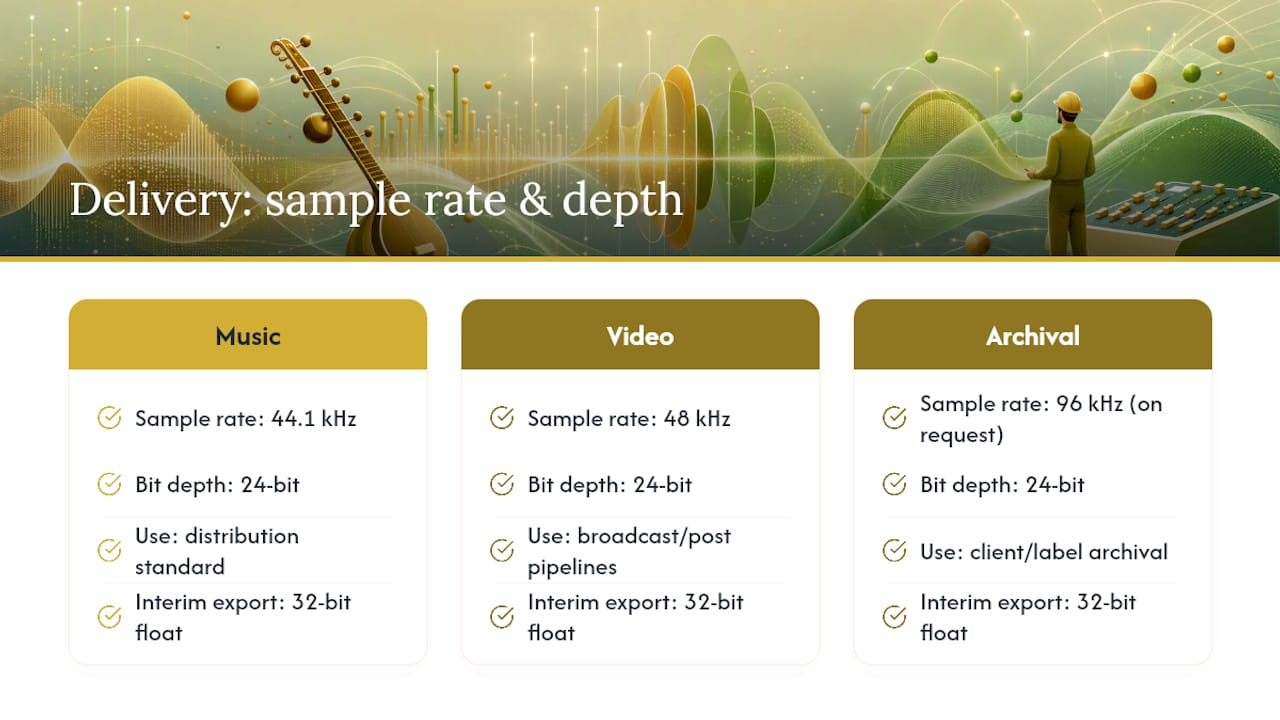
Bit depth matters more than sample rate for headroom during production. Keep sessions at 24-bit throughout tracking and mixing. If you need an interim export for a collaborator or a temporary bounce, 32-bit float gives you extra ceiling room against clipping during that intermediate stage, but your final delivered files should still land at 24-bit unless a client specifically wants otherwise.
File format should be Broadcast Wave (BWF), not standard WAV. BWF carries metadata inside the ‘bext’ chunk, including a time reference that anchors the file to its original position in the timeline. That single field prevents an entire category of “where does this go” confusion during reassembly.
Immersive audio adds one more layer. If the project was mixed in an object-based format, deliver ADM or DAMF files alongside a static speaker rendering as a fallback. Not every recipient has an object-based playback chain ready to go, so the fallback isn’t optional.
How Do You Consolidate and Name Stems Correctly?
This is where good sessions get ruined by rushed exports. Consolidation, sometimes called flattening, turns your multitrack session into standalone files that any DAW can import and align without manual work. Skip this step or do it carelessly, and you hand someone a puzzle instead of a deliverable.
Follow this sequence every time:
- Set your export range to the session start, not the first note played. Every consolidated track needs to begin at the same sample position, including silence before the first hit.
- Flatten each track into one continuous file. Never export separate regions and expect someone else to figure out the gaps. A common practical failure in delivered sessions is tracks that don’t share a start point, which forces the receiving engineer into tedious manual realignment.
- Bounce at your working sample rate and bit depth, then convert only if the recipient has specified something different. Converting sample rates introduces artifacts you don’t want baked into an archival file.
- Name each file with a consistent template. A pattern like
ArtistID_SongTitle_CONS_48k24bit.wavtells the recipient the artist, the track, the fact that it’s consolidated, and the technical spec, all without opening the file. - Decide on comps and silent tracks before export. If a track was recorded but muted for the final mix, note that in your track sheet rather than silently omitting it. If both processed and unprocessed versions of a stem are needed, deliver both only if that’s been agreed in advance. Sending double the files nobody asked for just adds confusion.
Pro Tip: Always export consolidated tracks starting at the session’s zero point, including any silence before the first note. That single habit guarantees the stems drop back into alignment the instant someone else imports them, with zero manual conform work on either end.
The most common pitfalls are painfully avoidable: mismatched start times between tracks, accidental truncation at the end of a file, and sample-rate conversions applied inconsistently across a stem set. Catch these before delivery, not after a frustrated callback.
What Documentation Should Accompany Every Deliverable?
Files without context are half a deliverable. The recipient needs to reconstruct your decisions, not just your audio, and that means paperwork travels with the package.
A clean folder structure makes this instant to navigate:
ProjectName/
  01_Masters/
  02_Stems/
  03_Multitracks/
  04_Documentation/
  05_Session_Files/
Inside the Documentation folder, include:
- Track sheets listing every recorded track, its source, and any processing notes
- Mic lists noting which microphone and preamp captured each source
- A recording map showing the physical or virtual layout of the session
- Lyrics and credits, especially for anything headed toward sync licensing or streaming metadata
- ISRC codes, assigned per recording for royalty tracking, along with cue sheets where publishing splits are relevant
Metadata can live two ways: embedded directly in the file (ID3 tags, BWF header info) or attached as a sidecar file (XML or PDF) alongside the audio. Embedding works well for anything that might get separated from its folder. Sidecar files work better for dense documentation, like full track sheets, that would clutter a file’s header. Use both when the project is significant enough to warrant it.
If you’re shipping physical media, label the drive or disc itself, not just the folder inside it. A Media ID label with project name, date, and contents saves someone from plugging in an unlabeled drive months later with no idea what’s on it. The Recording Academy’s Producers & Engineers Wing updated its delivery recommendations specifically to formalize these folder and metadata expectations across the industry, which tells you this isn’t a personal preference. It’s becoming the baseline.
Session notes about your production credits also matter here. If you need a refresher on what counts as a proper music production credit, that documentation belongs in this same folder.
Which Delivery Method Is Right for Your Project?
Three channels dominate professional delivery: physical drives, secure cloud storage, and SFTP. Each trades off speed, cost, and security differently, and the right choice depends on file size and how sensitive the material is.
Physical drives still make sense for massive projects, like full album masters with immersive stems, where upload time would eat an entire day. Secure cloud services (Dropbox, Google Drive with restricted sharing, or similar) work well for most day-to-day handoffs and cost little to nothing. SFTP suits studios and labels with existing infrastructure that expect a controlled, logged transfer environment.
Whichever method you choose, verification matters as much as the transfer itself:
- Generate a manifest listing every file in the delivery, with checksums (MD5 or SHA1) so the recipient can confirm nothing got corrupted or dropped in transit.
- Password-protect and encrypt anything containing unreleased masters, especially over cloud links that could get forwarded beyond the intended recipient.
- Version your deliveries clearly. If you send a corrected mix after an initial delivery, name it so nobody accidentally uses the outdated version.
Pro Tip: Include a manifest with checksums in every delivery package, and tell the recipient which app to run to verify them. It takes five minutes and eliminates the “did the file arrive intact” guessing game entirely.
Automating this with a script or a delivery tool saves time on repeat projects, but manual verification is fine for one-off sessions, as long as you actually do it.
What’s the Right Backup and Archival Plan?
Your backup plan is only as good as the media it lives on, and “I’ll back it up later” is how masters disappear. Two tiers cover almost every situation.
Minimum acceptable delivery is a primary master plus two secondary safeties, stored on different media from each other and from the working drive. If one drive fails, you still have two independent copies to recover from.
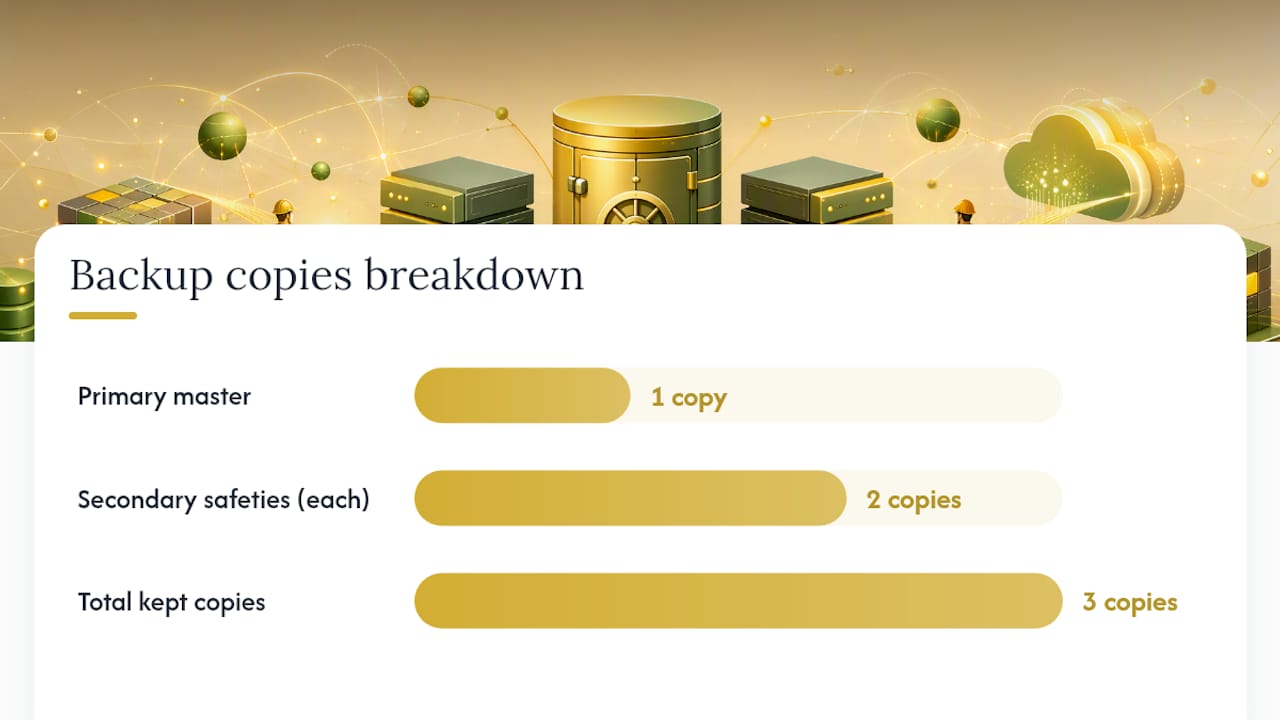
Preferred delivery goes further: every track flattened to Broadcast Wave format and transferred to approved long-term archival media, not just the final mix. This preserves the ability to remix or reconstruct the project years later, which the primary master alone can’t do.
A few practical habits keep an archive usable over time:
- Rotate and test archival media periodically. Drives fail silently more often than people expect.
- Plan for format migration every five to seven years, since storage formats and connectors go obsolete faster than the music does.
- Label every archival drive with project name, date, and a contents summary, matching the Media ID conventions from your delivery documentation.
- Store safeties in physically separate locations when the project’s value justifies it, protecting against fire, theft, or a single point of failure.
None of this is exotic. It’s just the difference between a project that survives a decade and one that quietly vanishes the first time a hard drive clicks instead of spins.
What Should a Final Delivery Checklist Include?
A tight checklist prevents the endless “can you also send me…” follow-up emails that eat a week of your time.
- Approved masters (stereo, plus immersive if applicable)
- Full stem set, named and consolidated per your template
- Consolidated multitracks, flattened to session start
- Documentation folder, including track sheets, credits, and ISRC codes
- Manifest with checksums, covering every file in the package
- Two safety copies, confirmed on separate media
Send final masters and safeties first, then documentation within a day or two, keeping the whole handoff inside a week for most projects. If a client requests a last-minute stem or an urgent revision, treat it as a versioned addendum, not a reason to rebuild the whole package.
| Deliverable | Priority | Typical Timing |
|---|---|---|
| Approved master | Critical | Delivered first |
| Stems | High | Within 1 to 2 days |
| Multitracks | High | Within 1 to 2 days |
| Documentation | Medium | Within 2 to 3 days |
| Archival safeties | Critical | Same window as master |
A short handoff email works better than a long one: state what’s attached, where the manifest is, and how to verify checksums. That’s it.
How Do You Preserve Nuance in Cultural and Acoustic Sessions?
Instruments like the sitar carry information a standard track sheet doesn’t capture, and losing that context means losing what made the recording worth booking in the first place. Mic placement alone deserves its own note, since a slight shift toward the sympathetic strings versus the main playing strings changes the tonal character a supervisor might want to recreate later.
Documentation for sessions like these should include:
- Tuning reference and the specific raga performed, since ragas carry distinct emotional and structural rules that a future editor needs to respect
- Tempo and any performed variations, noted per take
- Room and mic setup notes, especially distance and angle relative to the resonating gourd
Stems prepared this way let a music supervisor pull the sitar cleanly into a new context without flattening its character into something generic. That’s the difference between a usable cultural recording and one that gets quietly avoided because nobody can tell what it originally sounded like.
Why Cutting Corners on Deliverables Costs You Later
Budget and time pressure tempt everyone to skip the “extra” safety copy or skip writing track sheets nobody’s asked for yet. I get the instinct, but the math doesn’t favor it. A second safety copy costs almost nothing next to a full remix session six months later when the only surviving drive fails.
If you’re genuinely constrained, prioritize flattened, labeled files over polish. A slightly rough consolidated stem set beats a beautifully mixed master with no supporting documentation. Producing a verifiable, labeled archive isn’t extra work tacked onto the job. It’s the job.
— Rajib
Book a Session That Delivers Everything You Need, the First Time
Chasing down missing stems or unlabeled drives after a session wraps costs more time than most people budget for, and it’s entirely avoidable when the deliverable package gets built into the session from day one. Sitarrajib’s studio recording sessions include exactly that: approved masters, full stem sets, consolidated multitracks, and complete documentation covering tuning, raga, and performance notes for every sitar part recorded.
Every session booked through Rajib Karmakar comes with a deliverable package built around the standards covered here, so producers and music supervisors can integrate the recording without a single follow-up request. If you’re scoring a film, producing a record, or planning a project that needs authentic sitar work handled professionally from capture through handoff, book a live session recording and get a deliverable package built right the first time.
Sources
- Recommendation for Delivery of Recorded Music Projects (Including Stems and Mix Naming Conventions) — AES
- Stereo audio archival asset best practices — Universal Music content guide
- Recording Academy® P&E Wing 2025 Delivery Recommendations — press release
- Digital audio basics: sample rate and bit depth — iZotope